The shopper scans a barcode or picks an item without a code from a visual list (PLU lookup). The basket builds on screen as they go, with the running total always in view.
We scope: your catalogue, barcodes, and items sold by weight on a legally verified scale.
02 / 04
Check.
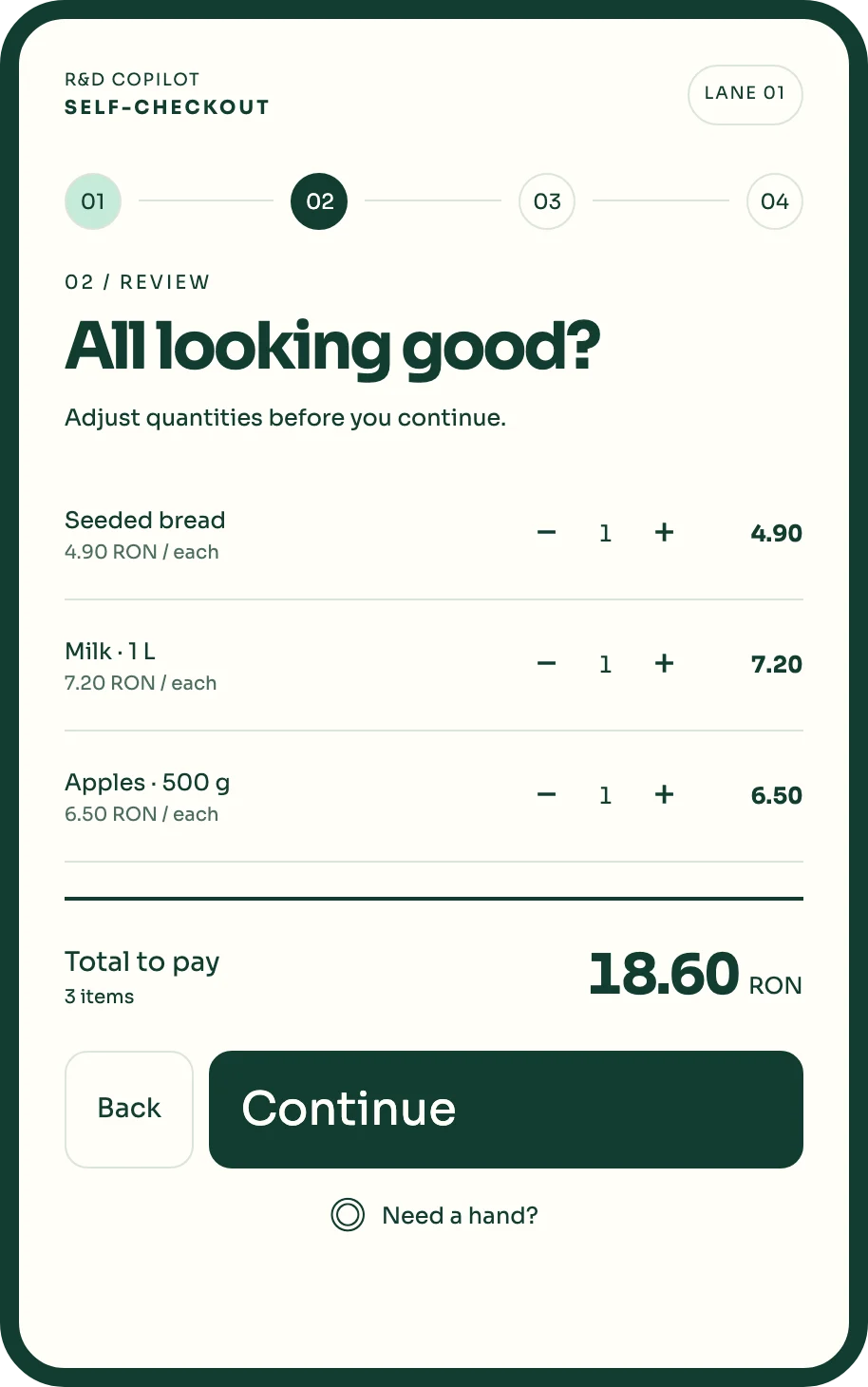
Check the basket before paying.
Quantities can be changed and items removed, and the total updates immediately. Nothing is paid until the shopper confirms the basket.
We scope: the bagging area, whether the lane uses a security scale, and which checks call a person.
03 / 04
Pay.
Payment happens on the terminal beside the screen.
The lane hands the total to the payment terminal you already use or choose with us. A declined card returns the shopper to the payment screen with the basket intact.
We scope: your payment provider and terminal connection.
04 / 04
Summary.
A clear summary, then the fiscal receipt.
The shopper sees every item and the total in one view. Where the law requires a fiscal device, the receipt is issued by it, integrated with its authorised distributor during setup (in Romania, the AMEF).
We scope: fiscal device where required, receipt printing (in Romania, for card payments only on request, as the law allows), and invoices for company buyers.
Screens from the self-checkout interface · Example data · store in Romania
Exceptions don’t freeze the screen. The lane tells the shopper what is happening, sends one clear request to the supervisor, and continues the same basket once it is resolved.
4 cases · swipe to see each
Age-restricted item
Shopper sees
A staff member will check your ID. You can keep scanning.
Supervisor · Lane 02
ID check
ApproveDeclineWaiting
Example data
Weight doesn’t match
Only with a security scale
Shopper sees
Please wait, help is on the way.
Supervisor · Lane 03
Bagging check
Confirm itemRemove itemWaiting
Example data
Remove an item
Your rules decide which actions need approval.
Shopper sees
Removing an item needs a supervisor.
Supervisor · Lane 01
Void Apples · 500 g · 6.50 RON
ApproveResolved
Example data
Shopper asks for help
From the “Need a hand?” button
Shopper sees
Someone is coming to lane 04.
Supervisor · Lane 04
Help requested
On my wayWaiting
Example data
Store ops
Every lane on one screen.
The supervisor view is designed with you for the pilot: which lanes are open, which need attention, and who took each request. Lane identity, ownership of each intervention and permissions are agreed before more lanes are added.
Store 01Supervisor on shift
Example data · pilot design
Lanes
Lane 01Open3 items · 18.60 RON
Lane 02ID checkWaiting 0:42
Lane 03IdleNo basket
Lane 04Help requestedWaiting 1:15
Intervention queue
Lane
Request
Waiting
Taken by
Action
04
Help requested
1:15
—
Take
02
ID check
0:42
—
ApproveDecline
Runs on the supervisor’s tablet or handheld, chosen during scoping.
What we set up in the pilot
Requests, not alarms
Each request names the lane and the reason.
One owner per request
Taking a request shows the others it is handled.
Back to the same basket
After approval the shopper continues where they stopped.
Recovery at the desk
Payment, receipt and stock stay tied to the same basket; if one step fails, staff pick the transaction up at the desk.
A lane has to fit the floor and the shopper’s reach: where the queue forms, where bags go down, how high the screen sits and where the card terminal falls to hand. We measure that in discovery and agree a setup for each lane.
01
Touch display
Portrait screen with large targets, readable from a step back.
02
Barcode scanner
Hands-free or handheld, depending on basket size.
03
Bagging area · security scale
Optional security scale; it checks the bag, it doesn’t price items. You decide which mismatches call the supervisor.
04
Payment terminal
Your provider’s card terminal, mounted at hand height.
05
Fiscal receipt
Issued by your fiscal device where one is required. In Romania that is the AMEF, which reports to ANAF as the law requires; integrated with its authorised distributor.
06
Lane light
Shows staff across the store when a lane needs help.
All six parts
Two formats
Countertop and freestanding self-checkout configurations
Countertop
Freestanding
Fits
Small baskets: cafés, canteens, convenience corners
Mixed grocery baskets
Footprint
On an existing counter
Its own stand and bagging shelf
Scanner
Handheld or built-in
Built-in, plus handheld for bulky items
Security scale
Usually not needed
Optional
Payment
Your terminal, beside the screen
Your terminal, mounted on the stand
Receipt
Your fiscal device
Your fiscal device
Supervisor
Same console
Same console
Hardware is agreed per store and quoted separately from the software.
Shopper asks for help · captured from the interactive lane · example data
One offer, three parts
What you get from us.
01
Software
Multilingual shopper screens (English and Romanian today)
Supervisor console
Store rules for exceptions
Updates
02
Hardware scoping
Site check of the lane
Reuse of what you have
Recommended setup
Installation support
03
Services
Catalogue, payment and fiscal integration set up in the pilot
Onboarding for your staff, agreed in the quote
Support in English and Romanian
EU hosting
The back of the kiosk
What a lane can connect to.
Each connection is set up and tested during the pilot, for your store. Nothing below runs on its own before that.
No. It gives shoppers with small baskets another way to pay, and one person supervises several lanes. Staff time moves to helping shoppers and restocking. Staffed tills can stay open for large baskets and for shoppers who prefer them.
How many lanes can one supervisor handle?
Many stores start with around four lanes per supervisor. Your baskets and layout decide the real number: we agree it in discovery and check it against real interventions during the pilot.
Does it work with my POS and my fiscal device?
The fiscal receipt, where a fiscal device is required, is integrated with your authorised fiscal device distributor during setup, and the catalogue comes from your POS or from RDCopilot POS. We confirm compatibility in discovery, before you commit to a pilot.
How are age-restricted products handled?
Scanning alcohol or tobacco sends an ID-check request to the supervisor, because their sale to minors is banned (in Romania, under 18). The shopper keeps scanning; payment waits until the check is approved.
What about theft and scanning mistakes?
You decide which situations call a person: removed items, weight mismatches if you use a security scale, or baskets over a set value. We don’t promise loss figures; the pilot shows how your lanes behave.
What happens if the internet connection drops?
We agree this in the pilot scope: which steps continue on the lane, and when the lane pauses and shows shoppers where to pay instead.
Is it accessible for every shopper?
Screens are designed with accessibility best practice in mind: large type and buttons, Romanian and English, and a help button that is always visible. Kiosk hardware, screen height, reach and the card terminal are chosen with you, against the European Accessibility Act requirements for self-service payment terminals.
Where is the data hosted, and what does it cost?
Data is hosted in the EU. Pricing is a one-off setup plus a monthly licence; you receive a written quote after discovery.
Keep self-checkout payment, receipt and stock states connected, with provider evidence and a recovery-desk handoff that preserves the original transaction.
Plan a supervised self-checkout pilot around suitable baskets, staff support and real equipment, then measure completion and interventions before adding more lanes.
Design the self-checkout supervisor queue around lane identity, intervention ownership and specific permissions, with a clear return to the shopper’s transaction.